Tạo một ứng dụng java điều khiển 1 một nút trên Server di chuyển java Socket UDP.
Xem thêm:
kết nối với Server FTP java socket
1. Mô tả bài toán
Đề bài: Viết chương trình client điều khiển 1 button trên server di chuyển thông qua giao thức UDP.
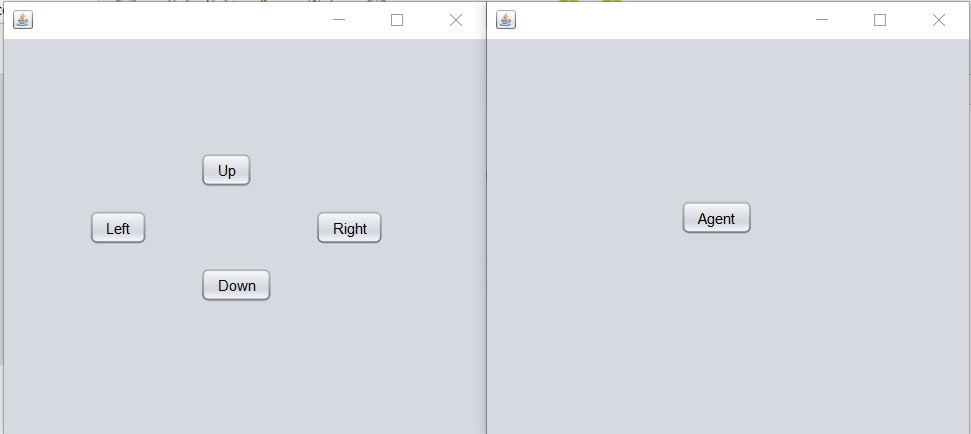
Video hướng dẫn chi tiết:
2. Code tham khảo
2.1 Code phía Server
- Khởi tạo máy chủ:
- Một đối tượng
DatagramSocketđược tạo và liên kết với cổng được chỉ định (SERVER_PORT). - Một luồng mới được tạo để chạy phương thức
MoveButton().
- Một đối tượng
- Lắng nghe gói tin đến:
- Phương thức
MoveButton()chạy trong một vòng lặp vô hạn (while (true)) để liên tục lắng nghe gói tin đến từ máy khách. - Mỗi lần vòng lặp chạy, một
DatagramPacketmới được tạo để nhận dữ liệu từ máy khách. - Dữ liệu nhận được từ gói tin được chuyển đổi thành chuỗi để xác định hành động cần thực hiện (di chuyển lên, xuống, trái, phải).
- Phương thức
- Điều khiển vị trí của button:
- Dựa vào dữ liệu nhận được từ gói tin, vị trí hiện tại của button được lấy.
- Dựa vào hướng di chuyển được chỉ định trong dữ liệu nhận được, vị trí của button sẽ được điều chỉnh tương ứng (lên, xuống, trái, phải).
- Sau khi thay đổi vị trí của button, giao diện người dùng sẽ được cập nhật để phản ánh sự thay đổi này.
public static final byte[] BUFFRER = new byte[4096];
DatagramSocket ds = null;
public static final int SERVER_PORT = 9555;

public Server() {
    initComponents();
    try {
        ds = new DatagramSocket(SERVER_PORT);

        new Thread(new Runnable() {
            @Override
            public void run() {
                MoveButton();
            }
        }).start();
    } catch (Exception e) {
        e.printStackTrace();
    }
}

private void MoveButton() {
    int newX;
    int newY;
    while (true) {
        try {
            DatagramPacket in = new DatagramPacket(BUFFRER, BUFFRER.length);
            ds.receive(in);

            String mess = new String(in.getData(), 0, in.getLength());

            Point currentPos = btn_agent.getLocation();

            switch (mess) {
                case "down":
                    newX = currentPos.x;
                    newY = currentPos.y + 20;
                    btn_agent.setLocation(newX, newY);
                    break;
                case "right":
                    newX = currentPos.x + 20;
                    newY = currentPos.y;
                    btn_agent.setLocation(newX, newY);
                    break;
                case "left":
                    newX = currentPos.x - 20;
                    newY = currentPos.y;
                    btn_agent.setLocation(newX, newY);
                    break;
                case "up":
                    newX = currentPos.x;
                    newY = currentPos.y - 20;
                    btn_agent.setLocation(newX, newY);
                    break;
                default:
                    throw new AssertionError();
            }
        } catch (Exception e) {
            e.printStackTrace();
        }
    }
}
2.2 Code phía Client
- Mỗi khi một button được nhấn, một hàm xử lý sự kiện được gọi tương ứng với button đó.
- Tạo một gói tin Datagram chứa hướng di chuyển tương ứng (“up”, “down”, “left”, “right”) và gửi gói tin này tới máy chủ.
public static final byte[] BUFFRER = new byte[4096];
DatagramSocket ds = null;
public static final int SERVER_PORT = 9555;
public static final String SERVER_IP = "localhost";

public Client() {
    initComponents();
    try {
        ds = new DatagramSocket();
    } catch (Exception e) {
        e.printStackTrace();
    }
}

private void btn_upActionPerformed(java.awt.event.ActionEvent evt) {
    String mess = "up";
    byte[] sendData = mess.getBytes();
    try {
        InetAddress address = InetAddress.getByName(SERVER_IP);

        DatagramPacket send = new DatagramPacket(sendData, sendData.length, address, SERVER_PORT);
        ds.send(send);
    } catch (Exception e) {
        e.printStackTrace();
    }

}

private void btn_rightActionPerformed(java.awt.event.ActionEvent evt) {
    String mess = "right";
    byte[] sendData = mess.getBytes();
    try {
        InetAddress address = InetAddress.getByName(SERVER_IP);

        DatagramPacket send = new DatagramPacket(sendData, sendData.length, address, SERVER_PORT);
        ds.send(send);
    } catch (Exception e) {
        e.printStackTrace();
    }
}

private void btn_downActionPerformed(java.awt.event.ActionEvent evt) {
    String mess = "down";
    byte[] sendData = mess.getBytes();
    try {
        InetAddress address = InetAddress.getByName(SERVER_IP);

        DatagramPacket send = new DatagramPacket(sendData, sendData.length, address, SERVER_PORT);
        ds.send(send);
    } catch (Exception e) {
        e.printStackTrace();
    }
}

private void btn_leftActionPerformed(java.awt.event.ActionEvent evt) {
    String mess = "left";
    byte[] sendData = mess.getBytes();
    try {
        InetAddress address = InetAddress.getByName(SERVER_IP);

        DatagramPacket send = new DatagramPacket(sendData, sendData.length, address, SERVER_PORT);
        ds.send(send);
    } catch (Exception e) {
        e.printStackTrace();
    }
}
Trên đây là code chương trình điều khiển một nút trên server. Cảm ơn bạn đã tham khảo lập trình mạng trên ttnguyen.net.
Bài viết liên quan:
lập trình với giao thức UDP Socket Java
phân tích n thành tích các số nguyên tố java socket
