Bài viết này sẽ hướng dẫn bạn từng bước xây dựng một AWS VPC cơ bản với Public/Private Subnet, Internet Gateway và Route Tables bằng Terraform.
1. Kiến trúc VPC mục tiêu
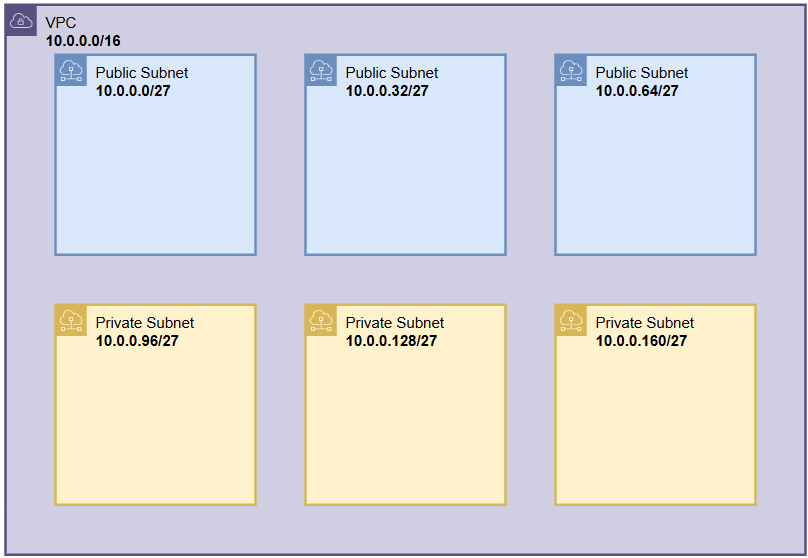
Trước khi bắt tay vào viết Terraform, chúng ta cần hình dung rõ kiến trúc mạng sẽ tạo ra. Trong ví dụ này, mục tiêu là xây dựng một VPC cơ bản tại region ap-southeast-1 (Singapore) với các thành phần sau:
- 01 VPC với CIDR block
10.0.0.0/16 - 01 Internet Gateway để cho phép các subnet public truy cập Internet
- 03 Public Subnets (mỗi AZ một subnet)
- 03 Private Subnets (mỗi AZ một subnet)
- 02 Route Tables:
- Public Route Table (liên kết với Internet Gateway)
- Private Route Table (chỉ dùng nội bộ, không ra Internet trực tiếp)
2. Kiến trúc thư mục Terraform
Để quản lý hạ tầng theo cách có tổ chức, chúng ta chia thành hai phần:
VPC/
│── environments/
│   └── prod/
│       └── prod.tfvars
│
│── modules/
│   └── vpc/
│       ├── locals.tf
│       ├── main.tf
│       ├── variables.tf
│
│── backend.tf
│── main.tf
│── provider.tf
│── variables.tf
- environments/prod/prod.tfvars: chứa thông tin riêng của môi trường (region, CIDR, account ID, role ARN…).
- modules/vpc/: module VPC tái sử dụng, định nghĩa VPC, subnet, route table, gateway.
- main.tf: gọi module VPC và truyền biến.
- provider.tf: cấu hình AWS provider, assume role nếu cần.
- backend.tf: định nghĩa version Terraform và provider.
3. Các bước triển khai với Terraform
a. File environments/prod/prod.tfvars
### Region and Environment Configuration
region = "ap-southeast-1"
environment = "prod"
use_name_prefix = false

### Role_arn and allowed_account_ids Configuration
role_arn            = "arn:aws:iam::891612588944:role/admin"
allowed_account_ids = ["891612588944"]

### VPC CIDR Block Configuration
vpc_cidr_block = "10.0.0.0/16"

public_subnets_cidr = [
  "10.0.0.0/27",
  "10.0.0.32/27",
  "10.0.0.64/27"
]

private_subnets_cidr = [
  "10.0.0.96/27",
  "10.0.0.128/27",
  "10.0.0.160/27"
]
b. Module modules/vpc/locals.tf
Định nghĩa 3 AZ tương ứng cho Singapore (ap-southeast-1a, 1b, 1c).
locals {
  availability_zones = ["${var.region}a", "${var.region}b", "${var.region}c"]
}
c. Module modules/vpc/main.tf
# Define VPC
resource "aws_vpc" "vpc" {
  cidr_block           = var.vpc_cidr_block # Source CIDR block for the VPC 10.0.0.0/16
  enable_dns_hostnames = true               # Enable DNS hostnames and assigned to instances
  enable_dns_support   = true               # Enable DNS support for the VPC
  tags = {
    Name = "vpc" # Name of the VPC
  }
}


#Public Subnets
resource "aws_subnet" "public_subnets" {
  count = length(var.public_subnets_cidr) # Identify the number of public subnets based on the provided CIDR blocks 10.0.0.0/27, 10.0.0.32/27, 10.0.0.64/27
  vpc_id = aws_vpc.vpc.id
  cidr_block = var.public_subnets_cidr[count.index] # Use the CIDR block for each public subnet from the provided list
  # Use availability zone for each public subnet to identify AZ
  availability_zone = element(local.availability_zones, count.index)
  map_public_ip_on_launch = true # Auto assign public IPs to instances launched in this subnet

  tags = {
    Name = "subnet-public-${count.index + 1}-${element(local.availability_zones, count.index)}"
  }
}


#Private Subnets
resource "aws_subnet" "private_subnets" {
  count = length(var.private_subnets_cidr)
  vpc_id = aws_vpc.vpc.id
  cidr_block = var.private_subnets_cidr[count.index]
  availability_zone = element(local.availability_zones, count.index)

  tags = {
    Name = "subnet-private-${count.index + 1}-${element(local.availability_zones, count.index)}"
  }

}


#Internet Gateway
resource "aws_internet_gateway" "igw" {
  vpc_id = aws_vpc.vpc.id

  tags = {
    Name = "igw"
  }
}

#Route Table for Public Subnets
resource "aws_route_table" "public_route_table" {
  vpc_id = aws_vpc.vpc.id
  tags = {
    Name = "public-route-table"
  }
}


# Route for Internet Gateway
resource "aws_route" "public_internet_gateway" {
  route_table_id         = aws_route_table.public_route_table.id
  destination_cidr_block = "0.0.0.0/0"
  gateway_id             = aws_internet_gateway.igw.id
}

# Route table associations for both Public
resource "aws_route_table_association" "public_subnet_association" {
  count          = length(aws_subnet.public_subnets) # Create associations for each public subnet
  subnet_id      = aws_subnet.public_subnets[count.index].id # Use the subnet ID for each public subnet
  route_table_id = aws_route_table.public_route_table.id # Use the public route table for associations
}

# Route Table for Private Subnets
resource "aws_route_table" "private_route_table" {
  vpc_id = aws_vpc.vpc.id
  tags = {
    Name = "private-route-table"
  }
}

# Route table associations for Private Subnets
resource "aws_route_table_association" "private_subnet_association" {
  count          = length(aws_subnet.private_subnets)
  subnet_id      = aws_subnet.private_subnets[count.index].id
  route_table_id = aws_route_table.private_route_table.id
}
d. Module modules/vpc/variables.tf
variable "vpc_cidr_block" {
  description = "CIDR block for the VPC"
  type        = string
}

variable "public_subnets_cidr" {
  type        = list(any)
  description = "CIDR block for Public Subnet"
}

variable "private_subnets_cidr" {
  type        = list(any)
  description = "CIDR block for Private Subnet"
}

variable "region" {
  description = "AWS region to deploy resources"
  type        = string
}
e. Root files
backend.tf
terraform {
#   backend "s3" {

#   }

  required_providers {
    aws = {
      source  = "hashicorp/aws"
      version = "~> 5.0"
    }
  }

  required_version = ">= 1.0.0"
}
main.tf
module "vpc" {
  source         = "./modules/vpc"
  vpc_cidr_block = var.vpc_cidr_block
  public_subnets_cidr = var.public_subnets_cidr
  private_subnets_cidr = var.private_subnets_cidr
  region = var.region
}
provider.tf
provider "aws" {
  region = var.region

  assume_role {
    role_arn = var.role_arn
  }
  allowed_account_ids = var.allowed_account_ids
}


provider "aws" {
  region = var.region
  alias = "platform_account"
}
variables.tf (root)
# Variable Provider

variable "region" {
  description = "The AWS region where the VPC will be created."
  type        = string
}

variable "environment" {
  description = "Environment name (e.g., dev, prod, staging)"
  type        = string
}

variable "use_name_prefix" {
  description = "Use name prefix for security groups"
  type        = bool
  default     = false
}

variable "role_arn" {
  description = "Role ARN to assume for cross-account access"
  type        = string
}

variable "allowed_account_ids" {
  description = "List of allowed account IDs for cross-account access"
  type        = list(string)
}

#VPC
variable "vpc_cidr_block" {
  description = "CIDR block for the VPC"
  type        = string
}

variable "public_subnets_cidr" {
  type        = list(any)
  description = "CIDR block for Public Subnet"
}

variable "private_subnets_cidr" {
  type        = list(any)
  description = "CIDR block for Private Subnet"
}
4. Triển khai Terraform
Chạy các bước sau để deploy:
cd vpc
terraform init
mkdir prod
terraform plan -var-file="environments/prod/prod.tfvars" -no-color -out="prod/tf.plan"
terraform apply prod/tf.plan

terraform destroy -var-file="environments/prod/prod.tfvars" -auto-approve
5. Kết quả đạt được
Sau khi apply thành công, bạn sẽ có:
- Một VPC
10.0.0.0/16tại Singapore - 03 public subnets (mỗi subnet tại 1 AZ, có IP public auto-assign)
- 03 private subnets (dùng cho backend DB, app server)
- 01 Internet Gateway gắn với Public Route Table
- 02 Route Tables: public và private
